Posts

Showing posts with the label translation

Liferay 7: Global Resource Bundle
Image
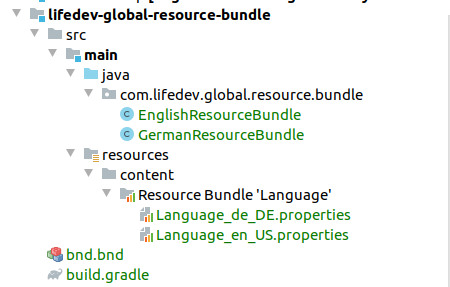
   Global Resource Bundle for Liferay 7 Overview Liferay Resource Bundle is used for messages translation on the portal. Each module may have it’s own Resource Bundle. This article explains how to create a “global” one, with translations available for any other module, including the Liferay core modules. Implementation 1. Create a module with the following structure: 2. Define dependencies in build.grade : dependencies {     compileOnly group : "com.liferay.portal" , name : "com.liferay.portal.kernel"     compileOnly group : "com.liferay.portal" , name : "com.liferay.util.taglib"     compileOnly group : "javax.portlet" , name : "portlet-api"     compileOnly group : "javax.servlet" , name : "javax.servlet-api"     compileOnly group : "jstl" , name : "jstl"     compileOnly group : "org.osgi" , name : "osgi.cmpn" } 3. Create a bundle descriptor bnd.bdn : Bundle-Name : Li...
Auto-translation with MS Translator

Image
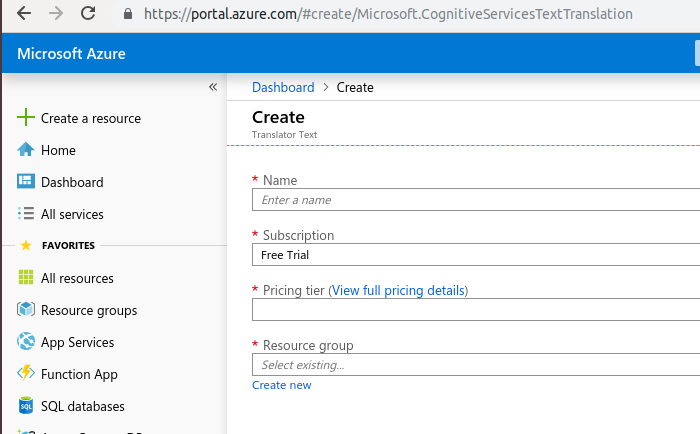
Auto-translation with MS Translator in Liferay 7.2   Liferay 7.2 comes with auto-translation feature and uses MS Translator to translate language keys to supported locales. Step 1 - Obtain subscription key 1) Create MS Azure account https://azure.microsoft.com (if not registered yet); 2) Create new “Translator Text”: 3) Copy the subscription key: Step 2 - Prepare files to translate Create module for resource bundle: Make sure, you have Language.properties under /src/main/resources/content location with required keys to be translated. Step 3 - Configure Gradle plugin Include ‘buildLang’ plugin and specify subscription key (from step1)  in build.gradle: dependencies {   compileOnly group : "com.liferay.portal" , name : "com.liferay.portal.kernel"    compileOnly group : "org.osgi" , name : "org.osgi.service.component.annotations"    compileOnly group : "com.liferay.portal" , name...