Posts

Public JAX-RS Application Implementation
Image
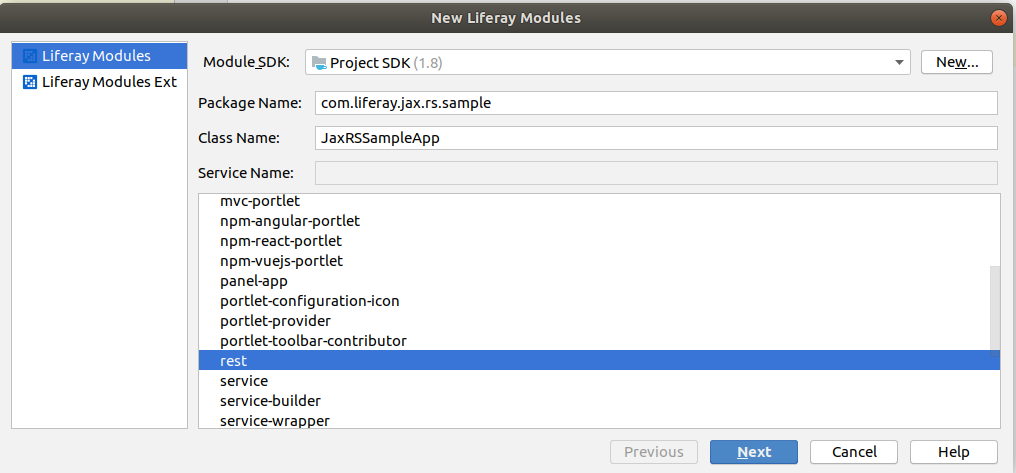
Public JAX-RS Application Implementation Overview This article will explain how to create a JAX-RS REST application, which will be publicly accessible.  Prerequisites  Create a Liferay Gradle Workspace with a Target Platform enabled. JAX-RS Module Implementation Create a new ‘rest’ module: Created module structure:   bnd.bnd file: Bundle-Name : liferay-jax-rs-sample Bundle-SymbolicName : com.liferay.jax.rs.sample Bundle-Version : 1.0.0 Liferay-Configuration-Path : /configuration build.gradle file: dependencies {   compileOnly group: "javax.ws.rs" , name: "javax.ws.rs-api"    compileOnly group: "org.osgi" , name: "org.osgi.service.component.annotations"    compileOnly group: "org.osgi" , name: "org.osgi.service.jaxrs" } Once you deploy sample generated JAX-RS application, and try to access it by URL http://localhost:8080/o/greetings - you’ll see the “Access denied” error:    ...

Creation Resources Available for Guest Users

Image
Creation Resources Available for Guest Users Overview If you implement a public web-site on Liferay, you need it’s content to be publicly available. By default, when you invoke the Liferay API to create some resource (document, web content, etc.) - it’s not created in such a way. But it’s easy to make it work.  Implementation When you invoke the Liferay API to create some resource you need - you’ll notice it accepts the ServiceContext object.  To make the resource available for Guest user - use:   serviceContext.setAddGuestPermissions( true ); To make the resource available for Site Members - use:  serviceContext.setAddGroupPermissions( true ); This is a sample code for File Entry: ServiceContext serviceContext = new ServiceContext(); serviceContext.setUserId(userId); serviceContext.setScopeGroupId(groupId); if (setViewPermission) {   serviceContext.setAddGroupPermissions( true );   serviceContext.setAddGuest...

Asset Publisher Widget Template: scoping front-end code to a portlet instance

Asset Publisher Widget Template: scoping front-end code to a portlet instance Overview Sometimes you need to implement some Javascript and CSS code inside your Asset Publisher Widget Template. It may work properly, but it may be broken when you add a second instance of Asset Publisher with the same Widget Template. This article will show how to "scope" your Javascript/CSS code to the portlet instance only. Fetch the portletId First you need to fetch the portletId in Freemarker code of your Widget Template: <#assign       portletId = themeDisplay . getPortletDisplay (). getId () /> Adjust the Javascript code Now that you have the portletId, you may use it to fetch the portlet container and bind any javascript events inside it, sample: $( document ). ready ( function () {     var portletId = " ${ portletId } " ;     var $container = $( "#portlet_" + portletId );        //tod...

Debugging JSPs in a JSP Fragment Module

Debugging JSPs in a JSP Fragment Module   If you're working on a JSP Fragment module, you'll probably want to debug all these endless scriptlets on the JSP you're trying to customize. By default, debug is not working for them (IntelliJ IDEA), but, fortunately, it's easy to make it work - just add the following lines to the bnd.bnd file of your module: -jsp : *.jsp,*.jspf -metatype : * -plugin.jsp : com.liferay.ant.bnd.jsp.JspAnalyzerPlugin -plugin.resourcebundle : com.liferay.ant.bnd.resource.bundle.ResourceBundleLoaderAnalyzerPlugin -plugin.sass : com.liferay.ant.bnd.sass.SassAnalyzerPlugin -sass : * Enjoy 😏

Liferay Keycloak integration - SSO and SLO implementation

Liferay Keycloak - Single Sign On / Single Logout Overview Previous article ( https://lifedev-solutions.blogspot.com/2019/10/liferay-keycloak-integration-using.html ) describes steps to configure Keycloak SSO Authorization in Liferay using OpenID Connect Provider. However, this approach has several limitations: - it can't be used as a default login mechanism: user needs to click "Sign In", chose "OpenId Connect", select "OpenId Connect Provider", and only then he is redirected to the Keycloak sign-in form; - After logging out from Liferay user stays logged in in Keycloak. This article will show how to overcome these issues. SSO with Servlet Filter For automatic redirection to Keycloak's Sign In form the servlet filter may be implemented: @Component ( immediate = true , property = { "servlet-context-name=" , "servlet-filter-name=Keycloak Login Filter" , ...

Fix AMD Loader issue for jQuery Plugins

Image
 Fix AMD Loader issue for jQuery libraries Prerequisites Custom portlet has included jQuery library, sample: com.liferay.portlet.header-portlet-javascript=/js/jstree.js" Error Javascript error during loading portlet:   Fix Modify the library source: ( function (factory) { "use strict" ; if ( typeof define === 'function' && define.amd ) { define ([ 'jquery' ], factory); } else if ( typeof module !== 'undefined' && module . exports ) { module . exports = factory( require ( 'jquery' )); } else { factory( jQuery ); } }( function ($, undefined) { ...   Replace the 'define.amd' with false to fix the AMD loading issue.   P.S. Related article for including jQuery into theme: https://lifedev-solutions.blogspot.com/2019/10/include-jquery-plugin-into-theme.html

Fixing PWC6188 JSTL Error on JSP

Fixing PWC6188 JSTL Error on JSP Prerequisites Portlet module with JSTL core included on JSP: <%@ taglib uri =" http://java.sun.com/jsp/jstl/core " prefix =" c " %> Error Such exception may be thrown after portlet deployment: 2020-03-18 17:42:26.302 ERROR [http-nio-8080-exec-8][PortletRequestDispatcherImpl:295] Unable to dispatch request: /view.jsp(1,1) /init.jsp(3,66) PWC6188: The absolute uri: http://java.sun.com/portlet_2_0 cannot be resolved in either web.xml or the jar files deployed with this application 2020-03-18 17:42:26.303 ERROR [http-nio-8080-exec-8][PortletServlet:112] javax.portlet.PortletException: org.apache.jasper.JasperException: /view.jsp(1,1) /init.jsp(3,66) PWC6188: The absolute uri: http://java.sun.com/portlet_2_0 cannot be resolved in either web.xml or the jar files deployed with this application javax.portlet.PortletException: org.apache.jasper.JasperException: /view.jsp(1,1) /init.jsp(3,66) PWC6188: The absolute uri: http...